Revenue Plays · Free download
Claude Video Editing: The Free Skill That Turns a Phone Clip Into a Short
The Claude video editing skill is a free SKILL.md file that teaches Claude Code to turn a raw phone clip into a captioned 9:16 Short with two free tools, ffmpeg and Whisper. Claude plans the cut with you, trims the ums, places captions clear of the app buttons and checks frames before it calls the clip done. An optional last step relights the speaker into a studio.
Ben Reed · · 9 min read
The video editing skill at a glance
| Part | The job | What you get | What it needs |
|---|---|---|---|
| SKILL.md | The 10 steps from raw clip to Short | A captioned 1080x1920 video ready to post | ffmpeg, Whisper and the Montserrat font, all free |
| Lessons | Story, hook and cutting rules, plus the review loop | A hook that holds and three review rounds at most | Nothing extra |
| Framing | Where the head, captions and title go | Numbers measured from 33 top Shorts | Nothing extra |
| Commands | The exact ffmpeg commands and Python helpers | Commands Claude runs, not guesses | Python |
| Multi-camera | Cutting a front camera with side angles | An 18-line editor's checklist | Two or three cameras |
| Panels | Split-screen proof panels and number callouts | Proof on screen while you talk | Nothing extra |
| Covers | A cover for every video | A visual hook for the feed | Nothing extra |
| Relight and 4 scripts | Puts the speaker in a studio with real light | The before and after look | A paid AI relighting tool after its free tier |
What is a Claude video editing skill?
A Claude video editing skill is a text file that tells Claude Code how to edit a video: the steps, the rules and the checks that must pass. Claude Code can run commands on your computer, so it runs the edit itself with ffmpeg and Whisper. You give it a clip and say "edit this clip into a Short." Claude follows the file and shows you the plan before it cuts anything.
The edit runs on your own computer. Nothing is uploaded unless you choose the relight step. The rules stay the same every time, so your Shorts look like one series.
| Editing by hand | An online AI editor | The skill | |
|---|---|---|---|
| Who cuts | You | The app | Claude, from your yes on a written plan |
| Where it runs | Your editing app | Their servers | Your computer |
| Captions | You place them | The app's style | Your fixed style, clear of the buttons |
| Cost | Your time | A monthly plan | Free tools, plus Claude Code |
| Change the rules | Remember them | Settings only | Edit one line in the file |
How the skill edits a clip
Claude writes and runs every command. The tools are ffmpeg, ffprobe and a local copy of Whisper, the free speech-to-text model.
1. Listen: transcribe with the ums left in
Claude checks the file first: length, size, frame rate and sound. Then Whisper writes out every word with its start and end time. The skill tells Whisper to keep filler words, so Claude can find every um and false start. If the footage is too dark or flat, Claude says so now. No edit fixes bad light.
2. Find the pauses
ffmpeg finds every quiet gap in the sound. Every cut will sit in one of them. Whisper's word times can be off by a few tenths of a second, so the skill cuts on the silence. A small Python helper moves each cut edge into the nearest pause.
3. Plan the cut in plain sentences
Before anything is cut, Claude writes the plan for you to read:
- the hook title on screen, under 8 words, in the first person, naming the viewer's problem (Claude writes three and keeps one),
- the spoken hook, 3 to 5 seconds, taken from the strongest line anywhere in the clip,
- the body, whole thoughts only, in the order you said them,
- what goes: filler, false starts, repeats and dead air.
You say yes or change it. The plan is saved as a list of start and end times, so the edit can be run again.
4. Cut, crop and level the sound in one pass
One ffmpeg command trims each piece, joins them, crops to 9:16, scales to 1080x1920 and evens out the sound. Each join keeps a short beat of about a quarter second, so the cut still sounds like one person talking. About 25 cuts in 100 seconds reads fine. At 35 it felt choppy, so the skill hides a jump cut with a 6 to 10% zoom.
5. Transcribe the cut again
Whisper runs a second time on the finished cut. The fresh word times drive the captions, and the second transcript proves the joins read cleanly.
6. Captions and the hook title
Captions use Montserrat ExtraBold in white, one to three words at a time, on one fixed line about 57% of the way down the frame. The hook title shows from the first frame for about three seconds, then goes away. Everything sits inside the safe zone, clear of the like, comment and share buttons on Reels, TikTok and Shorts:
| Zone | Keep clear | Why |
|---|---|---|
| Top | 13% (about 250 px) | App header and tabs |
| Bottom | 25% (about 480 px) | Caption, username, audio line |
| Sides | 12% each (about 130 px) | Like, comment and share buttons |
7. Check before calling it done
Claude draws the no-go zones on a still and looks at it. It pulls stills from the hook, the first caption, the middle and the end. It scans for black frames, checks the loudness, the length and the size, and listens to every cut edge. If one check fails, it fixes the clip and renders again. It never says a clip is done without looking at frames.
The studio relight (optional)
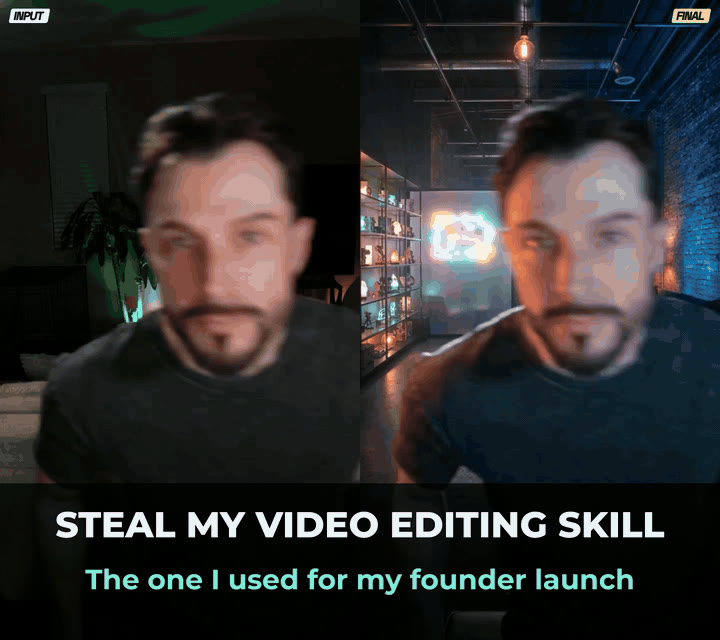
The right side of the video above is the relight. The skill puts the speaker in a better room with real light on the face, as the very last step, after the edit is locked.
Why not a colour grade
A colour grade can't add light that was never there, and it shifts skin colour. The look comes from relighting the person to match a new room.
What was tested
The skill records four rounds of tests from November 2026. Text-prompt edits came back flat, with the mouth drifting. A reference picture gave good lips but a frozen background. The winner was Higgsfield's Editing Room, Change location, with one studio picture you make once and reuse in every video. Its only gap is 720p output.
Scripts fix what the tool gets wrong
relight_assemble.pyupscales 720p to 1080x1920 and retimes the parts to 30 frames a second.relight_align.pyputs each cut back on the right frame. The tool moves cuts 2 to 3 frames late, so the lips drift out of sync.facelift.pylifts the face by about a third of a stop when it comes back grey, smoothed over 15 frames so it never flickers.splittone.pytones a shot toward the room when two paid redos fail, so you stop spending.
The checks: every cut within one frame of the source, lips in sync at full speed, and no brightness jump on the face above 5 out of 255. The first version hit 20 and flickered.
The reviewer agent
After the edit, a fresh agent gets the draft, the brief, the cut list and a checklist. It answers each line pass or fail with the time stamp, lists anything else you would notice and gives a percent chance you'll have no notes. Claude fixes the fails and runs it again. Round 3 is a spot check of only what changed, and there is never a round 4. You see one version.
See it work
The before and after (a real clip): the video at the top of this page. Left is the raw phone clip, filmed in a dark room. Right is the same clip after the skill, cut and captioned, then relit.
A cut plan (a sample of what Claude shows you)
Hook title: "My demo lost half the room"
Spoken hook: 0:41 to 0:45, "Half the room was gone by minute 20."
Body: 0:03 to 0:38, then 0:47 to 1:12, whole thoughts in order
Cut: 6 ums, one false start at 0:22, a repeat at 0:55, 4 seconds of dead air
Lines from the real SKILL.md:
## Never
- Re-encode the final more than once. Render from the original each time.
- Put text over eyes, nose or mouth, or inside the app zones.
- Post or upload anything. The user does that.
- Say it is finished without looking at frames.
How to install the Claude video editing skill
- Get the files. Get the video editing skill free. The download link and the two install commands open on the next page.
- Install it. In Claude Code, run the two plugin commands. Or copy the
video-editingfolder into~/.claude/skills/. You get 8 more launch skills with it. - Set up the tools once. Claude checks for ffmpeg, Whisper and the Montserrat font, and installs what is missing after you say yes.
- Ask in plain words: "Edit ~/Desktop/clip.mov into a Short." Claude finds the skill by itself.
Make it yours
Every rule is plain text. Change the caption font, the caption line or the hook length in SKILL.md, and Claude follows your version from your next ask. Skip the relight if you film in good light. The MIT licence lets you use the skill and change it, in paid work too.
Why I built it
I film a founder diary on my phone most days while I launch RevyOps, an AI CRM for Claude. I kept explaining the same edit rules to Claude in every chat: cut in the pauses, keep captions off the buttons, never call it done without looking. So I wrote them down once, then added every lesson from each review. I've spent 12 years building B2B sales teams at five software companies, and video is now part of how a founder sells.
Questions
Can Claude edit videos?
Yes, through Claude Code. Claude Code runs commands on your computer, so it can cut, crop and caption a video with ffmpeg and Whisper.
Is the Claude video editing skill free?
Yes. The skill is free under the MIT licence, and ffmpeg and Whisper are free. Claude Code needs a paid Claude plan. The optional relight uses a paid tool after its free tier, and Claude asks before spending credits.
How do I make a YouTube Short from a phone clip with Claude?
Install the skill, then tell Claude Code "edit this clip into a Short" with the file path. Claude transcribes it, shows you a cut plan, cuts and crops to 9:16, adds captions and a hook title, and checks the frames.
How do I relight a video with AI?
Use a relighting tool that changes the room and the light together. In our tests, Higgsfield's Editing Room, Change location, with one studio picture as the reference, held the face and lips best. Relight last, after the edit is locked, then fix the cuts and the face with the skill's scripts.
Is my video uploaded anywhere?
No, not for the edit. ffmpeg and Whisper run on your computer. Only the optional relight sends the clip to an outside service.
Do I need to know how to code?
No. You ask in plain words. Claude writes and runs every command, and the skill walks you through installing the free tools once.
Get the Claude video editing skill free
The download link and the two install commands open on the next page.