Revenue Plays · Free download
How to Scrape LinkedIn Post Engagers and Turn Them Into a Scored Call List
To scrape LinkedIn post engagers without using your own LinkedIn login, read them through a scraping service such as Apify, then score each comment and reaction on one record per person. The 9 free Claude Code skills on this page do it for your posts and your competitors' posts, and send the people who keep commenting into a LinkedIn campaign.
Ben Reed · · 9 min read
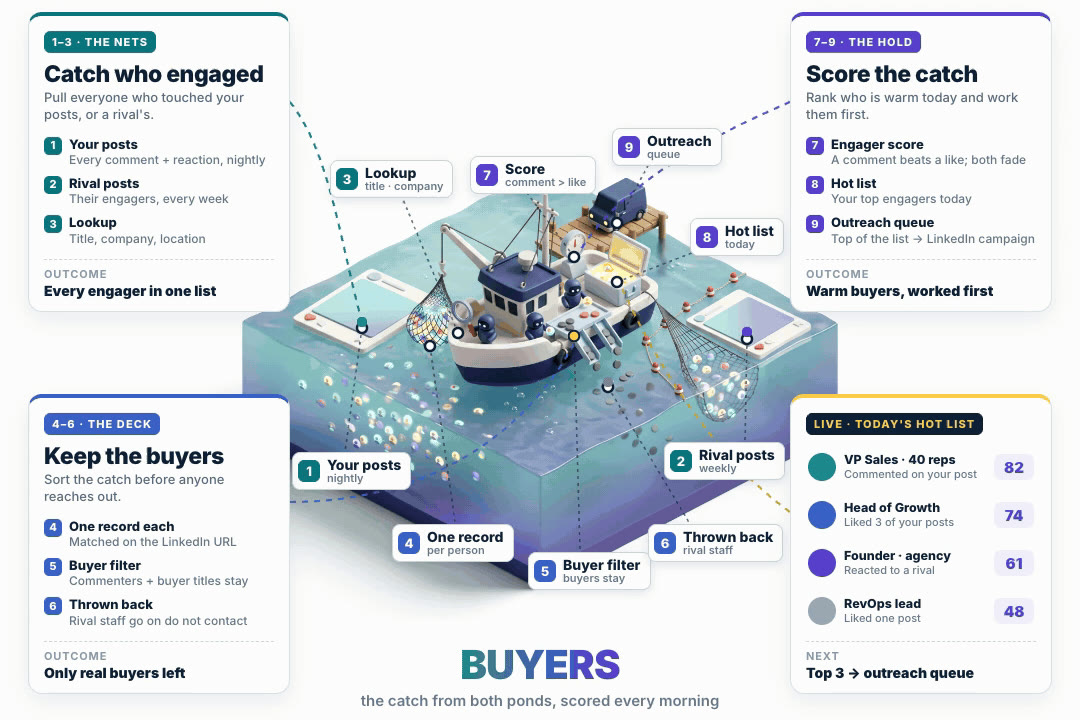
The 9 skills at a glance
| Stage | Skill | The job | What you get | What it needs |
|---|---|---|---|---|
| Pull | Own-post engagers | Reads your posts every day | Every comment and reaction from the last 14 days | An Apify token |
| Pull | Competitor engagers | Reads up to ten competitors every week | Who engaged with their posts in the last 7 days | An Apify token |
| Pull | Engager lookup | Adds the facts | Title, company, location and industry, paid for once per person | An Apify token |
| Sort | One record | Loads people | One person per LinkedIn URL, each engagement its own activity | RevyOps |
| Sort | Buyer filter | Keeps the right people | Every commenter, plus reactors with a buyer title | Your rows from steps 1 to 3 |
| Sort | Enemy check | Keeps rivals out | Competitor staff on do not contact, vendors flagged for you | RevyOps |
| Score | Engager score | Ranks warmth | Points per comment and reaction that fade over time | RevyOps |
| Score | Hot list | Shows who is hot | Your top engagers today, highest score first | RevyOps |
| Score | Outreach queue | Starts the follow-up | New people in your outreach view (2+ comments in 90 days), added to a LinkedIn campaign once each | RevyOps and a HeyReach campaign |
What is a LinkedIn post engager?
A post engager is anyone who comments on or reacts to a LinkedIn post. A comment takes effort and a like takes one tap, so a comment says more. Engagers on your own posts already know you. Engagers on a competitor's posts are looking at a product like yours right now.
A person who comments on Monday and reacts to a rival's post on Thursday becomes one warm lead with two reasons to talk.
| Your post engagers | Competitor post engagers | |
|---|---|---|
| What they know | You and your posts | A product like yours |
| How often the skills pull them | Every day | Every week |
The 9 skills, by stage
Claude runs them in order.
Pull
1. Own-post engagers: a LinkedIn post scraper that never misses a comment
Each day the skill reads your posts from the last 14 days through Apify, up to 1,000 comments and 1,000 reactions a post. It writes one row per engagement. For each post it checks the comments it read against LinkedIn's own comment count, and names any post that came up short. It never acts on LinkedIn: anything that does, like a message or a connection request, is done by you or your outreach tool.
2. Competitor engagers: the people shopping right now
You name up to ten competitors, with each founder's profile and the company page (founders' posts usually get far more engagement than the brand's). Once a week the skill pulls their posts from the last 7 days, up to 10 posts a profile, with up to 1,000 comments and 300 reactions a post. If a headline says the person works at a competitor you watch, the row is marked as staff for step 6.
3. Engager lookup: a LinkedIn profile scraper with a cache
The skill adds what you need to judge a person: title, company, location, industry, followers and whether they are open to work. It looks each person up once, ever, and keeps every result in a cache (a saved copy). The buyer filter runs on headlines first, so you only pay for reactors you will keep.
Sort
4. One record: one person per human
The skill loads each engager as one person, matched on a cleaned LinkedIn URL. Every comment and reaction becomes its own activity on that person, with the post link, the date and tags that say whose post it came from. A re-run stores nothing twice.
5. Buyer filter: commenters and buyer titles
Every commenter stays. A reactor stays if their headline shows a title that buys, such as founder, CEO, VP of sales or head of marketing. Students, interns, recruiters, people open to work and the groups you name as never buying are dropped. Each keeper gets a grade of Builder, Buyer or Unknown, with a reason of 25 words or fewer. When the skill is unsure, it keeps the person: a missed buyer costs a sale, and a wrong keep costs one message.
6. Enemy check: no messages to your rivals
Competitors watch each other's posts, and most commenters arrive with no company record. So the skill reads the headline. "Founder of" or "@" a competitor links the person to that company, and everyone at an enemy company goes on do not contact. Freelancers, consultants and agencies with no software product pass. A match the skill doubts goes to you instead.
Score
7. Engager score: a lead scoring model that fades
Each comment and reaction adds points, and the points lose half their value after a set time. Website visits, email replies and form fills add to the same score, so a commenter who also visits your pricing page rises fast.
| Activity | Points | Loses half its points after |
|---|---|---|
| Comment on your post | 10 | 30 days |
| Reaction on your post | 3 | 14 days |
| Comment on a competitor's post | 12 | 21 days |
| Reaction on a competitor's post | 4 | 10 days |
8. Hot list: who to talk to today
A saved view (a list that updates itself) holds everyone who engaged in the last 90 days, highest score first, with do not contact, enemies, customers, open deals and anyone contacted lately left out. A second view keeps people with 2 or more comments in 90 days: those are the people who keep showing up. Ask for it, and you get the top 10 with one line each, who is new at the top, and who commented twice this week.
9. Outreach queue: LinkedIn outreach to your hottest engagers
A workflow (a rule that runs by itself) adds each person who enters the outreach view (2 or more comments in 90 days) to your HeyReach campaign, once each, with a personal link that ties a click to them. You build the campaign and press start. The first message the skill suggests is a short thank-you that names what they commented on, never a pitch.
See it work
Three samples of what the skills produce.
One row from Own-post engagers (the format from the skill):
{ post_id, post_url, post_date, type: "comment" | "reaction",
  reaction_type, comment_text, comment_date,
  linkedin_url, name, headline }
Two people scored (a made-up example, using the starting points):
| Person A | Person B | |
|---|---|---|
| Comments | On a competitor's post, 3 days ago: 10.9 | On your post, 60 days ago: 2.5 |
| Reactions | On your post, yesterday: 2.9 | 5 on your posts, 40 days ago: 2.1 |
| Score today | 13.8 | 4.6 |
Person B engaged six times and Person A twice, but A is shopping this week.
A daily hot list read (a made-up example):
1. Head of Sales, 40-person software company · 31 points · commented twice on your post about cold email
2. Founder, B2B agency · 24 points · new today · commented on a competitor's pricing post
Commented twice this week: 3 people, all in the outreach view.
How to scrape LinkedIn post engagers: set up the 9 skills
You need Claude Code and an Apify account. Steps 4 and 6 to 9 are written for RevyOps, the AI CRM I'm launching. RevyOps opens to beta testers this December. HeyReach is only needed for step 9.
- Get the files. Get the 9 engager skills free. The download link and install commands open on the next page.
- Install them. In Claude Code, run the two plugin commands. Or copy the folders into
~/.claude/skills/for every project, or.claude/skills/in one project. - Save your Apify token in
~/.config/apify.key, one line. Never paste it into a chat. - Ask: "Set up engager scoring for me." Claude asks for your LinkedIn profile and up to ten competitor profiles, then walks the nine steps once.
- Run it daily for your posts and weekly for competitors. Claude Code's scheduled tasks can do this for you.
Make them yours
Each skill is a plain Markdown file. Change the buyer titles, the points or how often it runs, and Claude follows your version from the next run. The MIT licence lets you use, change and share them, in paid work too.
Why I built them
I'm launching RevyOps, an AI CRM for Claude, and LinkedIn is a big part of the launch. I wanted every comment on my posts, and on the posts of others in my space, to land on one person with a score, without my own account doing the collecting. The nine skills are the method Claude follows each day. I've spent 12 years building B2B sales teams at five software companies, and the warmest list always wins.
Questions
Are you able to scrape LinkedIn, and is it safe?
Yes, for public posts. A scraping service such as Apify reads the comments and reactions from its own servers, and the skills never use your LinkedIn login. Scraping is still limited by LinkedIn's terms, so check them and the rules where you work first.
How do I see who engaged with a LinkedIn post?
On your own post, LinkedIn lists the people under the reactions and comments. To keep them, skill 1 saves every one as a row each day, and skill 4 puts them on one record per person.
Can I see who engages with my competitors' posts?
Yes. Comments and reactions on public posts are visible, and skill 2 pulls them for up to ten competitors once a week.
How much does it cost?
The skills are free under the MIT licence. Apify charges for each run and lookup. The skills set a spend limit on every run, check your monthly use first and cache every lookup, so you never pay for the same person twice.
Do I need RevyOps?
Steps 1 to 3 work on their own and save files. Steps 4 and 6 to 9 are written for RevyOps. A CSV keyed on the LinkedIn URL works as a list, but it can't score, fade or start outreach.
Will Claude message people for me?
No. Claude pulls, sorts, scores and queues. Your HeyReach campaign sends, and only after you start it.
Get all 9 engager scoring skills free
The download link and install commands open on the next page.